
What are Core Web Vitals? Are they important? How to measure them and how to optimize them? We are going to answer all of these questions in this guide
The Web is suffering:
Let’s make a statement to begin. We are sending more and more kilobytes to users. According to HTTPArchive report, the median mobile webpage is 1900 KB! Comparing to 2011, we are hitting a 1200% evolution. That’s crazy!
What about JavaScript Kilobytes? Same trend. The median mobile web page sends 414 KB of JS. With a 700% evolution in comparison to 2011. According to the Web Almanac report, 37% of shipped JavaScript is UNUSED.
Slow website causes stress to users:
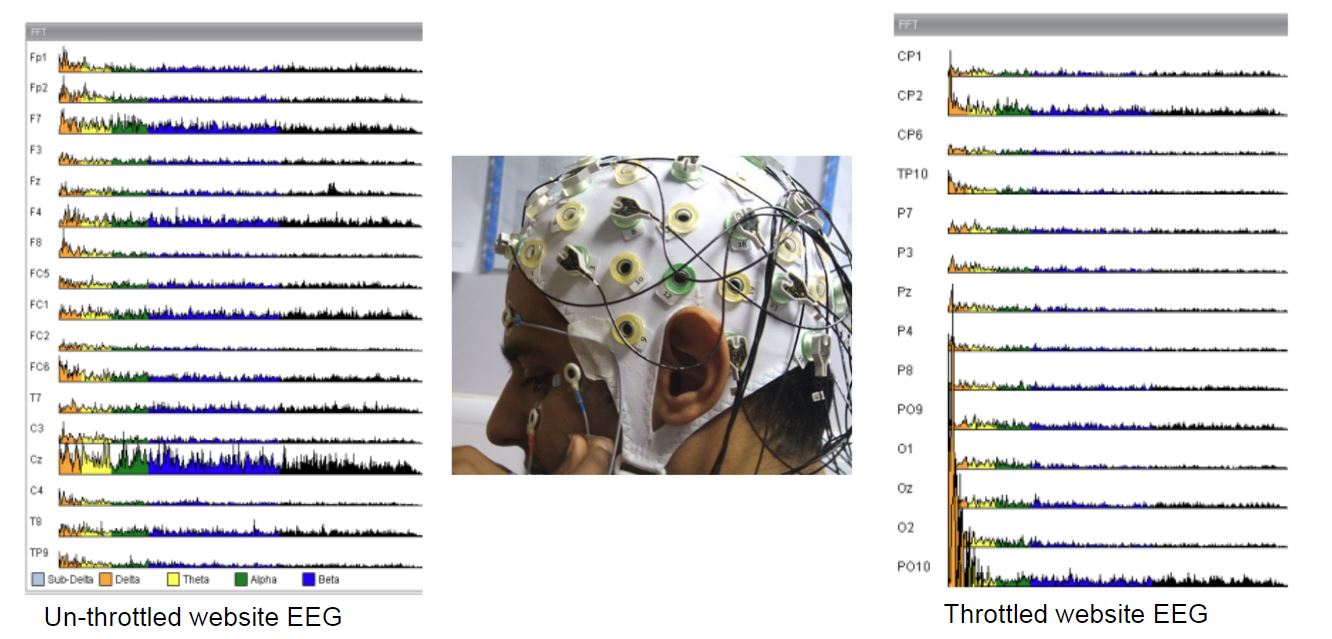
Bad user experience can cause bad feelings such as stress and anger. Many conducted studies showed that link! In 2010, Foviance conducted an EEG study that concluded that slow website users concentrate harder.
Measuring Alpha waves (an indicator of the level of relaxation a human has), showed that they depress by half when using a throttled (slow) website. Users had to concentrate 50% harder to achieve the same steps!
Other studies showed similar results. Simon Hearne published an aggregation of them in this post.
Put yourself in the user’s shoes. If a website causes you anger and stress, would you appreciate the experience? Will you like the brand? Will you stay loyal to the brand? No!
Low performance can seriously undermine brand/business health, reputation and value.

We should all work to improve the Web:
Web performance is not only the work of developers. It is every web worker subject!
Web performance is complex:
Web performance may appear difficult, so technical, and confusing to many of us. It is not a problem. The Web has never been easy and it is part of our lives. And I believe that difficulty comes mainly from the changing nature of web systems, technologies, and approaches.
Many new development languages, frameworks are appearing and gaining popularity. On the non-technical side, project management methods and frameworks are evolving and moving.
Web performance tools and metrics have multiplied making the task more difficult in the majority of cases.
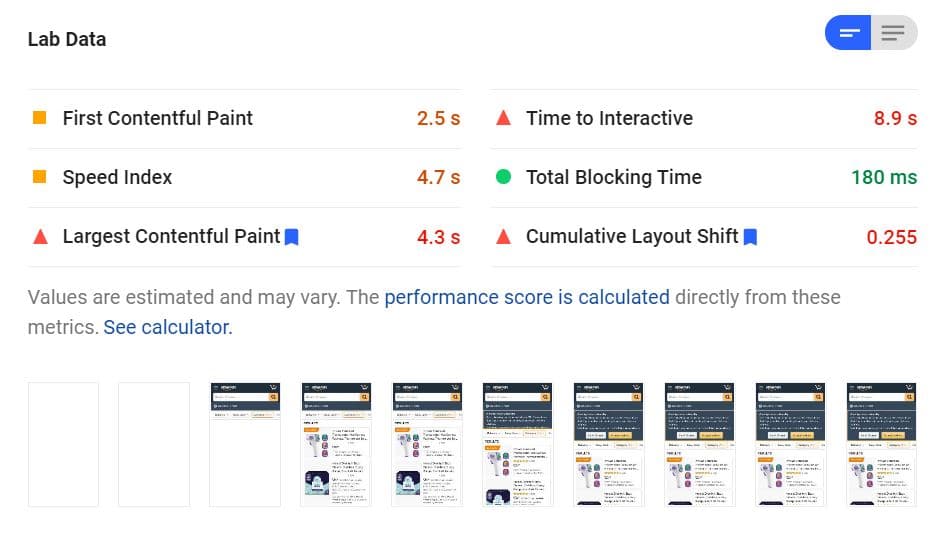
Google itself has 7 tools for measuring Web performance. Metrics are problematic for several reasons:
In addition, at every stage of the Web performance process, I personally struggle to choose the right 4 or 5 metrics that are representative, sufficient, and not “too much”.
Core Web Vitals or how Google is trying to make things simpler:
With Web Vitals, Google tries to simplify things with these 3 metrics. The goals of this simplification are:
How to measure Core Web Vitals?
There are two ways to measure web performance and Web Vitals. Lab synthetic tools and field (Real User Monitoring) tools
Lab tools:
They are good for debugging and measuring performance in controlled environments. Often it is a loading of the page with a browser tuned with emulated conditions. Lab tools don’t reflect what real users are facing.
Field tools
They are excellent to capture real-life user experience. Usually, they confirm and deny the trend seen on lab tools. However, field tools are not suitable for debugging performance issues.
Largest Contentful Paint – LCP
Largest Contentful Paint (LCP) is one of the most important user experience and web performance metrics. It measures the loading performance.
Cumulative Layout Shift – CLS
Cumulative Layout Shift is one of the most important user experience and web performance metrics. It measures the layout stability of a web page.
First Input Delay – FID
When Largest Contentful Paint is for loading performance, Cumulative Layout Shifts for visual stability, the pair “Total Blocking Time/First Input Delay” is for page interactivity and responsiveness.
Core Web Vitals optimization workflow
I always tell my clients that web performance is not a “one-shot project”. And as long as you keep building features, you need to consider performance at every step. To succeed in Web performance, we have to stick to a workflow.
Remember to show and share the results with the stakeholders to keep the Performance a subject on the table!
Final notes:
Core Web Vitals are a good representation of what users are experiencing on the Web. Stills the beginning of a long journey and we are experimenting with these metrics in real life. Web Vitals are and will evolve over time. What matters the most is continuously improving websites quality. Don’t do Performance for SEO, do it first for users.
Why Core Web Vitals matter for your business
Beyond the technical metrics, Core Web Vitals directly influence how users perceive your brand. A fast, stable, and responsive site builds trust and encourages engagement. Conversely, a sluggish or janky experience can drive users away, often permanently. Studies have shown that even a one-second delay in page load can reduce conversions by up to 7%. For e-commerce sites, this translates to lost revenue; for content sites, it means fewer page views and higher bounce rates.
Moreover, Core Web Vitals are now a part of Google’s search ranking signals. While they are not the sole factor, they can be the tiebreaker between two otherwise equal pages. This means that ignoring them could cost you organic visibility. But remember: optimizing for users first will naturally improve these metrics, and the SEO benefits will follow.
Understanding the thresholds and scoring
Each Core Web Vital has specific thresholds that define a “good,” “needs improvement,” or “poor” experience. For LCP, good is under 2.5 seconds; for FID, under 100 milliseconds; for CLS, under 0.1. These thresholds are based on real-world data and are designed to reflect what users actually perceive as acceptable. Falling into the “poor” range means a significant portion of your users are having a frustrating experience.
Google evaluates these metrics at the 75th percentile of page loads, meaning that at least 75% of your users should have an experience within the “good” threshold for the metric to be considered passing. This approach ensures that you are not just optimizing for the average user but for the majority. It’s a higher bar than many realize, but it aligns with the goal of delivering a consistently excellent experience.
Common causes of poor Core Web Vitals
Many factors can degrade your Core Web Vitals. For LCP, the usual culprits are slow server response times, render-blocking JavaScript and CSS, and large image or video files that delay the main content. For FID, heavy JavaScript execution, long tasks, and excessive main-thread work are the primary offenders. CLS is often caused by images or ads without reserved space, dynamically injected content, or web fonts that cause a flash of invisible text.
Addressing these issues requires a combination of technical fixes and design decisions. For example, preloading critical resources, compressing images, and using modern formats like WebP can dramatically improve LCP. Breaking up long JavaScript tasks and deferring non-critical scripts can reduce FID. And always specifying width and height attributes for media, or using aspect-ratio boxes, can prevent layout shifts.
How to prioritize your optimization efforts
With limited resources, you need to prioritize. Start by measuring your real-user data with tools like Google Search Console’s Core Web Vitals report or the Chrome User Experience Report. Identify which metric is failing the most and focus there first. Often, improving LCP will also have a positive effect on other metrics, as a faster load time can reduce user frustration and improve perceived stability.
Next, use lab tools like Lighthouse or WebPageTest to diagnose specific issues. These tools can pinpoint the exact resources or scripts causing problems. But remember, lab data is synthetic; always validate with field data. A common workflow is to use lab tools for debugging and field tools for monitoring. This combination ensures you are fixing the right things and seeing real-world impact.
The future of Core Web Vitals and the evolving landscape
Core Web Vitals are not static. Google has already announced that FID will be replaced by Interaction to Next Paint (INP) in March 2024, a metric that better captures overall responsiveness. This evolution reflects the ongoing effort to measure what truly matters to users. As web technologies advance, new metrics may emerge, and thresholds may be adjusted.
Staying informed and adaptable is key. Regularly review Google’s web.dev documentation and participate in the web performance community. For a curated list of tools and guides, check out our Web Performance Resources page. By keeping performance a continuous priority, you’ll be ready for whatever changes come next.